Wednesday, January 13, 2016

Application Software Implementation - Requirements Processes


Processes descriptions are numbered for ease of access. These numbers do not necessarily represent the sequence in which they are performed.  Also for ease of access the numbers are prefixed by a letter showing the type of segment or path that it applies to. Below is a list of typical Requirement Processes 


L
Launch (Project Launch & Segment Launch)
R
Requirements
S
Selection
D
Delivery
P
Post-implementation (Post-implementation Management, Post‑implementation review, Business Benefits Assessment)
Q
Quality Audit reviews
T
Terminate Project

Ref
Process
Path Templates
R010
Foundation - “as-is” fact-find
Requirements - Full, Project Model
R020
Business Vision / Objectives / Do-Wells
Requirements - Full, Project Model
R030
External Business Review
Requirements - Full, Project Model
R040
Constraints
Requirements - Full, Requirements - Catalogue, Project Model
R050
Needs for business process change and priorities
Requirements - Full, Project Model
R055
Select package-specific base business model templates
Project Model
R060
External Technical Review
Requirements - Full, Project Model
R065
Create and maintain enterprise business model
Project Model
R067
Schedule process modelling workshops
Project Model
R068
Conduct process modelling workshops
Project Model
R069
Agree initial enterprise business model
Project Model
R070
System Vision: functions, data, volumes, performance, scope, objectives, boundaries / interfaces, technical goals, timescales
Requirements - Full, Requirements - Catalogue, Project Model
R080
Define Topics / IPs
Requirements - Full
R090
Organisational Impact
Requirements - Full, Project Model
R100
Identify requirements
Requirements - Full, Requirements - Catalogue, Project Model
R110
Interfacing review
Requirements - Full, Project Model
R120
Gap Analysis - existing systems vs requirements
Requirements - Full, Project Model
R125
Gap Analysis - requirements vs target solution
Project Model
R130
Establish architectural options
Requirements - Full, Requirements - Catalogue, Requirements - Validate, Project Model
R140
Estimate costs and benefits per option
Requirements - Full, Requirements - Catalogue, Requirements - Validate, Project Model
R150
Collate and agree requirements report
Requirements - Full, Requirements - Catalogue, Requirements - Validate, Project Model
R200
Agree appropriate processes
Requirements - Validate
R210
Agree appropriate deliverables
Requirements - Validate
R220
Review Client’s statement of requirements
Requirements - Validate
R230
Agree and conduct any further work required
Requirements - Validate
R900
Update materials
Requirements - Full

Monday, January 11, 2016

Application Software Implementation - Launch Processes

Processes descriptions are numbered for ease of access.  These numbers do not necessarily represent the sequence in which they are performed.  Also for ease of access the numbers are prefixed by a letter showing the type of segment or path that it applies to. Below is a list of typical Launch Processes.


L
Launch (Project Launch & Segment Launch)
R
Requirements
S
Selection
D
Delivery
P
Post-implementation (Post-implementation Management, Post‑implementation review, Business Benefits Assessment)
Q
Quality Audit reviews
T
Terminate Project

Ref
Process
Path Templates
L010
Review/confirm Scope and Objectives
Project Launch
L020
Review / confirm business needs and anticipated benefits
Project Launch
L030
Select Path(s)
Project Launch
L040
Define and agree Project Management techniques
Project Launch
L050
Define and agree change management approach (for organisational issues)
Project Launch
L060
Set up / revise and agree communications plan
Segment Launch - Delivery, Segment Launch - Requirements, Segment Launch - Selection, Readiness & Rollout
L065
Define and agree approach to Skills Transfer
Project Launch
L070
Define and agree requirements for linkage with other methodologies.
Project Launch
L080
Do Quality Plan
Project Launch
L090
Produce high-level “Path Plan”
Project Launch
L100
Define organisation, people and support requirements
Project Launch
L110
Agree Project Launch deliverables
Project Launch
L120
Detail the detailed “Segment Plan”
Segment Launch - Delivery, Segment Launch - Requirements, Segment Launch - Selection
L130
Detail / revise staffing, team structure and organisation
Segment Launch - Delivery, Segment Launch - Requirements, Segment Launch - Selection
L140
Set up / review infrastructure
Segment Launch - Delivery, Segment Launch - Requirements, Segment Launch - Selection
L150
Confirm or renegotiate contractual relationship
Segment Launch - Delivery, Segment Launch - Requirements, Segment Launch - Selection, Review path plan - Post Requirements, Review Path Plan - Post Selection
L160
Mobilise resources
Segment Launch - Delivery, Segment Launch - Requirements, Segment Launch - Selection
L170
Set up / review user involvement
Segment Launch - Delivery, Segment Launch - Requirements, Segment Launch - Selection
L180
Set up / review management organisation
Segment Launch - Delivery, Segment Launch - Requirements, Segment Launch - Selection
L190
Implement / re-implement project management and control techniques
Segment Launch - Delivery, Segment Launch - Requirements, Segment Launch - Selection
L200
Present project / segment approach to user community and team
Segment Launch - Delivery, Segment Launch - Requirements, Segment Launch - Selection, Design Prototyping & Construction
L310
Reconfirm approach
Review path plan - Post Requirements, Review Path Plan - Post Selection
L320
Review / reconfirm / agree high-level “Path Plan”
Review path plan - Post Requirements, Review Path Plan - Post Selection

Sunday, January 10, 2016

Key Issues in a Software Package - Focused Implementation

Why a PACKAGE FOCUSED APPROACH?

I believe that every opportunity to achieve a better solution should be taken.  Better can mean cheaper, more functional, more effective, less risky, or more rapid.
The best balance of costs and benefits will normally be achieved by using standard components wherever possible; for example, standard, open hardware solutions, standard networks, standard packages, standard relational databases and standard software tools.  These will minimise the need for expensive development work.
From this desire to exploit the software to the full, we can deduce a number of key consequences:

Avoid Wasted Effort

In a custom-built system, a high level of detail is required in the requirements, analysis and design documentation to make sure you get what you want.  With packages, much of the routine processing is already dealt with.  You do not need to waste time in defining and documenting these aspects of the system. 

Adapt to the Package

Some organisations spend a vast amount of time, effort and money on adapting a package to meet their own preconceptions.  A better preference is to look for ways in which the organisation can design new business processes based around the industry best-practice options found in the package, thus leading to lower costs and, often, a new view of how things can be done.  Only when this fails should you consider amending the package.

Parallel Approach

Since the technical architecture of the package is fixed, much more work can be performed in parallel.  The overall detail of the system can be broken into logically distinct aspects.  These are far simpler to understand which leads to genuine user participation and review.
Tasks also become simpler to perform.  Altogether, this leads to better use of staff, less elapsed time, less effort, and a better overall solution.

User Focus

Technical aspects of the design have already been completed.  This leaves the team free to concentrate on the functional issues - the user’s viewpoint, the user’s needs. 

Prototyping

The package is ready to work immediately.  This makes it an excellent design aid.  Ideas can be tried out and tested before becoming fixed in the design.
Development of the system can be carried out as an extension to this design prototyping to build a full system prototype ready for formal testing.Prototyping during design and development tasks is a valuable option that can lead to dramatic improvements in elapsed time and quality.

Tuesday, January 5, 2016

Software Implementation - Paths

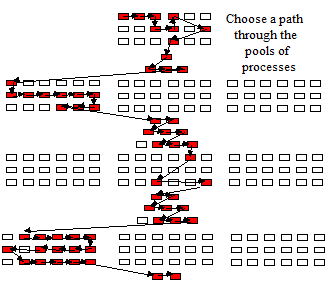
The combination of optional processes and alternative processes that is chosen and agreed for any implementation segment is known as a Path.  A number of standard paths can be developed.  These are described in Path Templates, i.e. a list of all processes normally conducted within a segment when a given approach is called for.
Path Templates do not define all possible paths.  On the contrary, Path Templates only define example paths.  An implementation can function with any path, provided that it contains a valid and logical combination of related processes.
The actual combination of processes for any given project is defined in the project’s Path Plan. The Path Plan gives a high-level “management plan” view of the overall project.  It would show the processes and key high-level deliverables along with an initial summary view of resourcing and timescale requirements.  This Path Plan is agreed before or during the Project Launch segment.   
The Project Launch segment explains the basic concepts.  It shows the main choices for the Requirements, Selection and Delivery segments along with inter-segment, management paths.  For each of the work segments, the main illustrated Path Templates allow for a full way of doing things, a faster shorter way, and by-passes situations where the normal work is not required.
Note that the diagram above only illustrates the concept of paths.  One important point to note is that parallel concepts can also apply to the paths and segments.  It is feasible for the paths or segments to overlap, for example, some tasks in a preceding segment may be being finalised while the QA review is taking place, and while the planning and launch for the next segment is being started, and, possibly, where some initial tasks of the following segment are already in progress.
There are other defined path templates dealing with specific cases which have not been shown in the diagram for the sake of clarity and simplicity.  Also note that “Plan/Launch” is an abbreviation for the two templates “Review Path Plan” and “Segment Launch”.
Processes may be mandatory, normal or optional.  Alternative processes may sometimes be defined for the same aspect of a project where there are differing needs and market conditions to address.  In many cases there will be alternative processes depending on the circumstances of the customer or the scope of the business requirements.  In this way we can be left open so that many different valid paths can be defined through the processes.
Where a new need is identified, new or revised processes can be added into this framework without disturbing the overall design of the project.  This allows for an extensible simply and rapidly methodology to meet all needs in the ever-changing marketplace.
Examples of standard Path Templates are defined as follows:

Project Launch

Segment Launch - Requirements Segment

  • Requirements - Full
  • Requirements - Catalogue
  • Requirements - Validate
  • Quality Audit - Requirements
  • Review Path Plan (Post Requirements)

Segment Launch - Selection Segment

  • Selection - Full
  • Selection - Short Form
  • Requirements/Selection - Fast-Track Selection
  • Selection - Confirm
  • Quality Audit - Selection
  • Review Path Plan (Post Selection)

  Segment Launch - Delivery Segment

  • Delivery - Integrated Design Development and Implementation
  • Delivery - Brief Delivery
  • Delivery - Implementation Only
  • Delivery - Quality Audit
  • Terminate project 

Monday, January 4, 2016

Software Implementation Processes - Overview

Implementing a software package solution can be defined as a collection of “processes”. Each area of activity within implementation is detailed as a process.

Processes may be mandatory, normal or optional.  Alternative processes may sometimes be defined for the same aspect of a project where there are differing needs and market conditions to address.  In many cases there will be alternative processes depending on the circumstances of the customer or the scope of the business requirements.  In this way a project can be left open so that many different valid paths can be defined through the processes.
Where a new need is identified, new or revised processes can be added into the framework without disturbing the overall design of the project.  This allows the implementation to be extensible simply and rapidly to meet all needs in the ever-changing marketplace.
For each process there is detailed documentation including:
  • its definition,
  • a summary of its purpose and content,
  • planning information concerning when it should be used and how it relates to other processes,
  • details of deliverables, receivables, tools and materials
  • detail of the issues and approach.

This detail may be coupled to an example sub-plan for the process.  This is known as a “Process Plan” or “mini-plan”.

Processes available

Processes descriptions are numbered for ease of access.  Note that these numbers do not necessarily represent the sequence in which they are performed.  Also note that for ease of access the numbers are prefixed by a letter showing the type of segment or path that it applies to.  These prefixes are:

L
Launch (Project Launch & Segment Launch)
R
Requirements
S
Selection
D
Delivery
P
Post-implementation (Post-implementation Management, Post‑implementation review, Business Benefits Assessment)
Q
Quality Audit reviews
T
Terminate Project
Further explanations and detail concerning a Process are detailed in a description and discussed later in the Blog.  This will explain the detail of the issues and tasks involved and give some indication concerning the scheduling and planning of the process’s tasks.  The Process description also shows some of the main tools and materials that may be used during the Process (see sample process overview table below).

Ref
Process
Optionality
Definition
Path Templates


D010
Preliminary Assessment
Optional - used where insufficient information is available to plan the project at a detailed level
An initial fact-finding study to establish in detail the scope of the project, work required, resource requirements, resource availability, timescale requirements, priorities etc.
Segment Launch - Delivery
D090
Implement communications programme
Optional - good practice where the success of the project requires the dissemination of information or the promotion of changed attitudes amongst a large number of staff.
Undertake the communications activities per plan.
Readiness & Roll-out